Latent Dirichlet Allocation
Text Mining Module 3: A Code Along
Welcome to the Text Mining Code Along for Module 3
The Text Mining course is designed for those seeking an introductory understanding of quantifying the text in documents to better understand their properties.
The following Code Along is a companion to the Module 3 case study’s Model stage.
Module Objectives
This Code Along dips our toes into modeling text as data. In very simple terms, modeling involves developing a mathematical summary of a dataset, which can help us further explore trends and patterns in our data. By the end of this module we will learn how to:
- Fit a Topic Modeling with LDA.We will learn to use the
topicmodelspackage and associatedLDA()function for unsupervised classification of our forum discussions to find natural groupings of words, or topics. - Choose K. We will take an introductory look at fitting our LDA to K, the number of topics within the text.
Context of the Problem

Akoglu, K., Lee, H. & Kellogg, S. (2019). Participating in a MOOC and Professional Learning Team: How a Blended Approach to Professional Development Makes a Difference. Journal of Technology and Teacher Education, 27(2), 129-163.
Load Libraries
tidytext: Tidies text data by tokenizing and allows us to cast our document term matrix, an essential input for LDA.topicmodels: Implements Latent Dirichlet Allocation (LDA) and Correlated Topic Models (CTM) for extracting topics from text data.ldatuning: Helps determine the optimal number of topics for LDA models using various evaluation metrics.
- Load those packages into your IDE.
- You may have trouble loading in one or more of these packages. Why might that be? What would you need to do first?
Read in Your Data
Create a Document Term Matrix
Latent Dirichlet allocation (LDA) algorithms (via
LDA()in R) expects a document-term matrix (DTM) as the data input.To create our DTM, we’ll need to first
count()how many times eachwordoccurs in each document, orpost_idin our case, like so:
- Use
cast_dtm()to create a DTM offorums_tidy, saving it as new objectforums_dtm
LDA Recap
LDA Assumes:
- Every document contains a mixture of topics.
- Every topic contains a mixture of words.
Now we must choose a number of topics that might exist across these discussion forums. Remember: We have to identify this number ourselves!
Fitting a Topic Modeling
Since it looks like there are about 20 distinct discussion forums, we’ll use that as our value for the k = argument of LDA(). This is a number that we can adjust as we go, if it seems like it’s not capturing a full range of themes or provides redundant themes.
Creating the LDA
Now it’s time to create the LDA from the DTM using our (somewhat) arbitrated k of 20.
NOTE: This is computationally intensive, so don’t panic if R seems to take a long time to create the new
forums_ldaobject (or even freeze!).
Viewing LDA Output
You can view any number of words within a topic by using the terms() function. We’ll also send this to the as_tibble() function to make the output a little easier to read:
# A tibble: 5 × 20
  `Topic 1`  `Topic 2` `Topic 3`   `Topic 4` `Topic 5`  `Topic 6` `Topic 7`
  <chr>      <chr>     <chr>       <chr>     <chr>      <chr>     <chr>
1 div        students  students    td        stats      amp       data
2 hypothesis task      statistical 0         ap         resource  students
3 class      data      statistics  style     feel       link      questions
4 chance     span      discussion  span      class      sharing   question
5 http       tasks     age         width     statistics http      collect
# ℹ 13 more variables: `Topic 8` <chr>, `Topic 9` <chr>, `Topic 10` <chr>,
#   `Topic 11` <chr>, `Topic 12` <chr>, `Topic 13` <chr>, `Topic 14` <chr>,
#   `Topic 15` <chr>, `Topic 16` <chr>, `Topic 17` <chr>, `Topic 18` <chr>,
#   `Topic 19` <chr>, `Topic 20` <chr>
Adjust the word number argument in
terms()to make the word list 10 per topic instead.Note the differences in the output. How does adjusting this “window” change your interpretation of the themes?
# A tibble: 10 × 20
   `Topic 1`  `Topic 2` `Topic 3`   `Topic 4` `Topic 5`  `Topic 6` `Topic 7`
   <chr>      <chr>     <chr>       <chr>     <chr>      <chr>     <chr>
 1 div        students  students    td        stats      amp       data
 2 hypothesis task      statistical 0         ap         resource  students
 3 class      data      statistics  style     feel       link      questions
 4 chance     span      discussion  span      class      sharing   question
 5 http       tasks     age         width     statistics http      collect
 6 statistics activity  agree       border    school     9         sets
 7 null       question  results     color     teach      shoes     set
 8 difference coke      activity    top       teaching   pdfs      analyze
 9 section    pepsi     reading     align     resources  site      analysis
10 href       line      approach    rgb       confident  resources collection
# ℹ 13 more variables: `Topic 8` <chr>, `Topic 9` <chr>, `Topic 10` <chr>,
#   `Topic 11` <chr>, `Topic 12` <chr>, `Topic 13` <chr>, `Topic 14` <chr>,
#   `Topic 15` <chr>, `Topic 16` <chr>, `Topic 17` <chr>, `Topic 18` <chr>,
# `Topic 19` <chr>, `Topic 20` <chr>Finding K
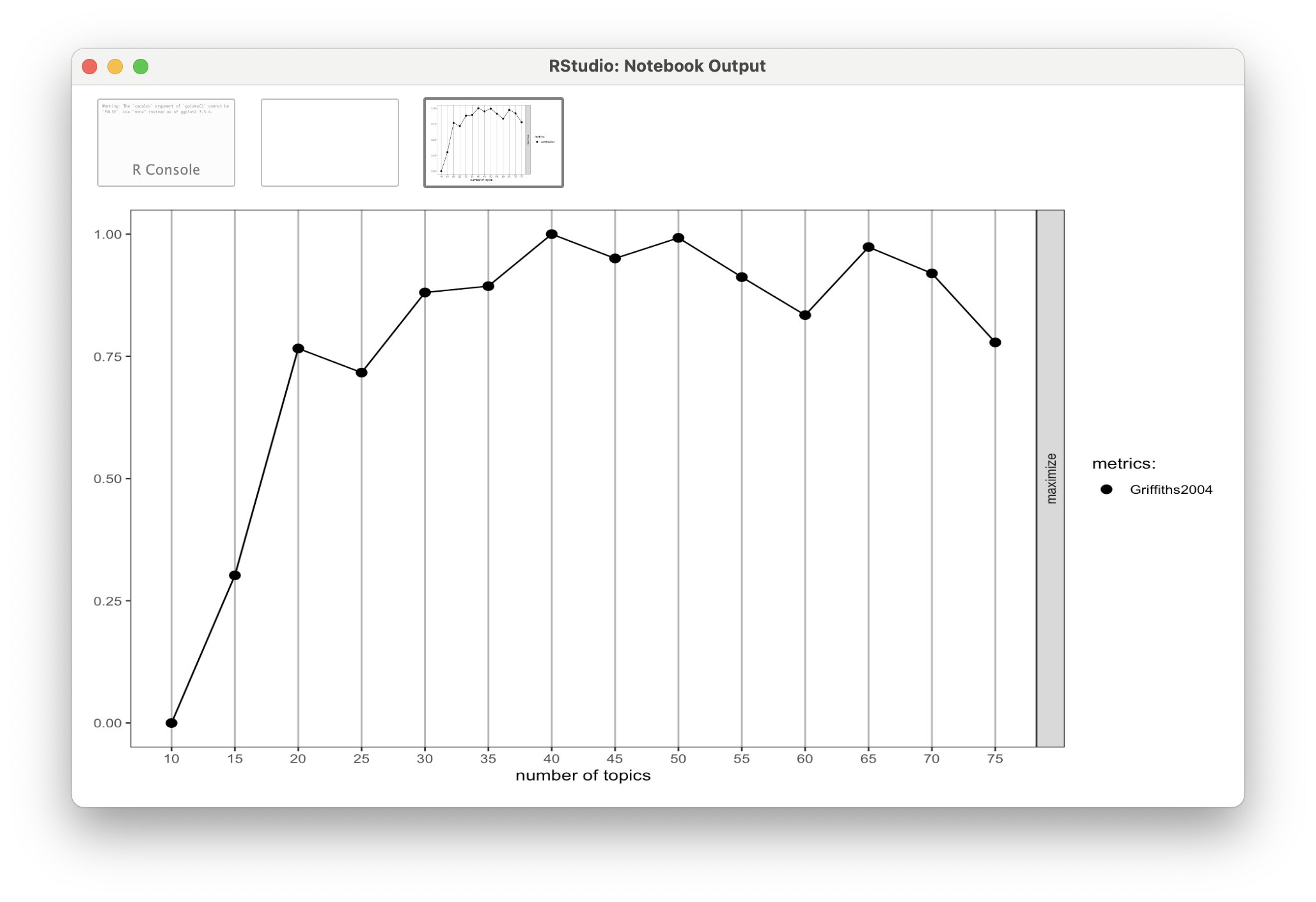
Refitting the LDA
Rerun
LDA()with our new K of 14, saving as aforums_lda_newobject.Use terms() to compare the outputs.
❓Discussion
What did you notice between the LDA outputs?
What do you think would happen if you asked for a K much lower than 14?
What’s Next?
- Complete the Module 3 case study
- Complete the Topic Modeling badge
- Do essential readings for the next module
